Voice Profile
A voice profile is an agent's voice: one TTS model, one base identity, a
few speech settings, and a list of named delivery modes such as angry or
calm. Each agent has at most one. Every speaking node of the agent
(Speak and Generate and Speak)
speaks with it. The nodes themselves hold no voice settings, only their text
routing and sentence chunking, so one workflow can drive many characters with
different voices.
You pass the profile when you create the agent. Later you can replace it with
SetAgentVoice, or switch its delivery mode with SetAgentDeliveryMode.
ChangeAgentParam cannot reach any voice field.
Protocol v27
Before protocol v27 each speaking node carried its own tts_model_name,
speaker_id, speed, tts_lang, tts_voice, tts_voice_description,
tts_delivery_instruction and (on Generate and Speak) emit_visemes.
Those node fields are gone. See
Moving from node voice fields below, and
the release notes of the release that ships
protocol v27 for the manual migration steps for Unity and Unreal projects.
Fields
VoiceProfile (schema: tryll/schema/voice.fbs).
| Field | Type | Default | Range | Description |
|---|---|---|---|---|
tts_model_name |
string | — | catalog TTS name | The TTS model. Required: there is no catalog default, and an empty name fails with 3023. |
speaker_id |
int | 0 |
0 to the model's speaker count − 1 |
Built-in voice for multi-speaker models: Supertonic 3 style 0–9, Orpheus preset 0–7, Maya1 preset 0–1. Single-speaker models (Pocket TTS, Chatterbox, Qwen3-TTS Base) accept only 0. |
reference_voice |
string (file path) | empty | — | Reference clip for voice-cloning models (Pocket TTS, Chatterbox, Qwen3-TTS Base), relative to the storage root. Empty uses the model's default voice; Qwen3-TTS Base has none and requires a clip. Locale-aware: voices/loc/<locale>/x.wav beside voices/x.wav wins when the session locale matches. |
voice_description |
string (multiline) | empty | ≤ 1024 bytes | Maya1 only. Natural-language identity (age, accent, pitch, timbre). Replaces the speaker_id preset. |
speed |
float | 1.0 |
0.1–3.0 |
Speech-rate multiplier. Must stay 1.0 on models without speed control (Orpheus, Maya1, Qwen3-TTS). |
lang |
string | empty | — | Synthesis language on models that pick it per call (Supertonic 3, Qwen3-TTS). Empty uses the session locale, then the catalog default. Rejected on fixed-language models (Pocket TTS, Orpheus, Maya1, Chatterbox). |
expressiveness |
float | 0.5 |
0.0–2.0 |
Chatterbox only: the exaggeration used by neutral and by modes that do not set their own. Ignored by other models. |
prepare |
VoicePreparation |
Eager |
Eager, Lazy |
When reference clips are prepared. See Clip preparation. |
emit_visemes |
bool | false |
— | Send a lip-sync viseme track for every sentence the agent speaks, from any speaking node. See Add Lip Sync to a Character. |
delivery_modes |
[DeliveryMode] |
empty | — | Named deliveries. See Delivery modes. |
default_delivery_mode |
string | empty | a defined mode name | Mode active after the voice is set. Empty means neutral. |
DeliveryMode:
| Field | Type | Default | Range | Description |
|---|---|---|---|---|
name |
string | — | [a-z0-9_]{1,32} |
Required. Unique in the profile. neutral is reserved. |
reference_voice |
string (file path) | empty | — | Clone models: a clip of this character speaking in this mood. Replaces the profile's reference_voice while the mode is active. |
instruction |
string (multiline, localizable) | empty | ≤ 1024 bytes | Maya1: sustained delivery clause added to the voice description. A known keyword becomes a tuned clause (see Maya1); other text is used as written. |
expressiveness |
float | -1 |
0.0–2.0 |
Chatterbox: exaggeration for this mode. Negative means "use the profile's expressiveness". |
speed_scale |
float | 1.0 |
0.5–2.0 |
Multiplies the profile speed while the mode is active. Must stay 1.0 on models without speed control. |
Rules
The server checks the whole profile when the voice is set: at CreateAgent and
at SetAgentVoice. A profile that fails is rejected; nothing is applied.
- A speaking agent needs a voice. If any node of the graph speaks and the
request has no voice,
CreateAgentfails with3025 AgentVoiceRequired. There is no default voice. - An agent that never speaks loads no TTS model. You may still pass a
voice. The server checks that its
tts_model_nameis in the catalog and validates the profile against that model's catalog capabilities. It does not load the model. - Unsupported fields are errors, not ignored. A field the loaded model
cannot use fails with
3023 InvalidVoiceProfile, for example areference_voiceon Supertonic 3, avoice_descriptionorinstructionon anything but Maya1, aspeedorspeed_scaleother than1.0on Orpheus, Maya1 or Qwen3-TTS, or a non-emptylangon a fixed-language model. The message names the field and, for a mode, the mode. - Text limits.
voice_descriptionandinstructionare at most 1024 bytes and must not contain",<,>or control characters (tab, CR and LF are allowed). - Clip files must exist when the voice is set, inside the storage root.
- Session language. When
langis empty and the session locale is a language the model does not declare, the voice fails with3017 ModelLanguageUnsupported. Setlang, or pick a model that covers the language.SetSessionLocalestill feeds the voice's language each turn.
Delivery modes
A delivery mode is a named way of speaking: angry, calm, whisper. Game
code picks one with SetAgentDeliveryMode(mode, intensity). The server turns
that into whatever the loaded model understands, so game code does not need to
know which model a character uses.
neutralis built in. It is the base identity with no delivery applied. You cannot define it, and it is always accepted.- A mode may be empty. A mode with no fields set sounds like
neutral. Define the same mode names on every profile, and a call such asSetAgentDeliveryMode("angry")works on every character, including voices that have no way to express anger. - It applies from the next sentence. The call is accepted at any time, even mid-turn. A sentence already handed to the TTS model is never changed.
- Only the API sets it. Nodes, the language model and inline tags cannot switch the mode.
- An unknown name fails with
3024 UnknownDeliveryMode, and the current mode stays. - The mode survives a voice change if the new profile defines a mode of the
same name. Otherwise the new profile's
default_delivery_modeapplies, and theAckcarries awarning.
Intensity
intensity is a number from 0 to 1 (clamped; default 1). It scales the
active mode where the model can use it:
- Speed. Effective speed =
speed× lerp(1,speed_scale, intensity), clamped to0.1–3.0. At intensity0the mode'sspeed_scalehas no effect. - Chatterbox. Exaggeration goes from the profile's
expressiveness(at0) to the mode'sexpressiveness(at1). - Maya1. See Maya1 instructions and intensity.
- A reference clip is all or nothing. Intensity does not blend clips.
neutral ignores intensity.
What a delivery mode can change, per model
Only three things in the current models carry a sustained mood: a reference clip (clone models), a natural-language clause (Maya1), and the Chatterbox exaggeration scalar. Supertonic 3 and Orpheus have no emotion control. On those two, a mode can only change speed, or must stay empty.
| Model | Base identity | A delivery mode can set | intensity does |
Cost of switching mode |
|---|---|---|---|---|
| Supertonic 3 | speaker_id (style 0–9) |
speed_scale only |
scales speed_scale |
none |
| Pocket TTS | reference_voice (default bria.wav) |
reference_voice, speed_scale |
scales speed_scale only |
first use of a clip computes an embedding, unless it was prepared |
| Chatterbox EN / ML / Turbo (internal) | reference_voice (model default) |
reference_voice, expressiveness (where the model supports it), speed_scale |
lerps expressiveness; scales speed_scale |
first use of a clip encodes it, unless it was prepared |
| Qwen3-TTS 1.7B Base | reference_voice (required) |
reference_voice only |
nothing | first use of a clip runs the speaker encoder, unless it was prepared |
| Orpheus 3B FT | speaker_id (preset 0–7) |
nothing: modes must be empty | nothing | none |
| Maya1 3B | voice_description, else speaker_id (preset 0–1) |
instruction |
rewrites the clause's intensity word | none |
Clone models copy the mood of the clip along with the timbre, so a mode for Pocket TTS or Qwen3-TTS is "a recording of this character being angry". Record every mode clip with the same speaker; a clip from another speaker changes who is talking. See Add Emotions to a Voice for the recipe, and Clone a Voice for the clip itself.
Changing the Orpheus preset changes who speaks, so it is not a delivery. Use
SetAgentVoice for that.
expressiveness is accepted only by Chatterbox variants whose model has an
exaggeration input; ListModels reports it as TtsCapabilities.expressiveness.
Maya1 instructions and intensity
A mode's instruction is added to the voice description as a delivery clause.
These keywords map to tuned clauses, matched as whole words (so unhappy does
not match happy):
| Keyword | Clause |
|---|---|
angry, anger |
angry tone at high intensity |
excited |
energetic tone at high intensity |
frightened, fearful |
frightened tone at high intensity |
happy, happily |
happy tone at medium intensity |
sad, sadly |
sad tone at medium intensity |
calm |
calm tone at low intensity |
whisper |
whispering, very quiet delivery |
serious |
serious, grave tone |
sarcastic |
sarcastic, dry tone |
disappointed |
disappointed, flat tone |
Any other text is passed to the model as written.
Intensity rewrites the clause's at <level> intensity words, and only when
intensity is below 1: below 0.34 gives low, below 0.67 gives
medium, anything else high. At 1 the clause stays as authored. A clause
with no intensity words, such as sarcastic, dry tone, ignores intensity.
In our listen-back measurements, excited and angry raised Maya1's pitch
clearly. happy and sad on flat text were within noise.
Changing the voice at runtime
SetAgentVoice replaces the whole profile, including the model.
- Idle only. It is rejected with
3004 AgentBusywhile a turn runs, and also while the turn is paused. - All or nothing. The server validates the new profile and prepares its clips before it swaps. If anything fails, the old voice stays.
- Delivery mode. Kept by name when the new profile defines it, otherwise
the new
default_delivery_mode, and theAckcarries awarning. - No voice yet. An agent created without a voice cannot get one later:
SetAgentVoiceandSetAgentDeliveryModefail with3025. Recreate the agent with a voice.
Clip preparation
Clone models derive state from each clip (a speaker embedding or encoded audio) the first time they use it.
Eager(default): the server prepares every clip in the profile, the base clip and every mode clip, when the voice is set.CreateAgentandSetAgentVoicetake longer, and the first sentence in a new mode has no extra delay. Prepared clips stay cached while the agent's voice holds them.Lazy: each clip is prepared the first time it is spoken, so that sentence starts later. Use it for experiments.
Models without clips (Supertonic 3, Orpheus, Maya1) have nothing to prepare.
Audio stream per turn
One agent turn has one audio stream, even when several speaking nodes run:
TtsAudioFormatFrameis sent once per turn, by the first speaking node that produces audio. The sample rate cannot change inside a turn.- Viseme offsets count from that format frame across every speaking node of the turn.
TtsAudioFrame.node_namestill names the node that produced each chunk.
API
from tryll_client import DeliveryMode, VoiceProfile

mack = VoiceProfile(
    tts_model_name="Pocket TTS (int8)",
    reference_voice="voices/mack.wav",
    emit_visemes=True,
    delivery_modes=[
        DeliveryMode(name="angry", reference_voice="voices/mack_angry.wav"),
        DeliveryMode(name="calm",  reference_voice="voices/mack_calm.wav"),
    ])

agent = client.create_agent(graph, voice=mack)
agent.set_delivery_mode("angry", intensity=0.8)   # from the next sentence
agent.set_delivery_mode("neutral")
agent.set_voice(other_profile)                     # idle only
Errors raise TryllError with code 3023, 3024, 3025, 3004 or
3017. See the Python client reference.
Tryll::VoiceProfileT mack;
mack.tts_model_name  = "Pocket TTS (int8)";
mack.reference_voice = "voices/mack.wav";
mack.emit_visemes    = true;

auto angry = std::make_unique<Tryll::DeliveryModeT>();
angry->name            = "angry";
angry->reference_voice = "voices/mack_angry.wav";
mack.delivery_modes.push_back(std::move(angry));

Tryll::Client::AgentCreateOptions opts;
opts.voice = std::move(mack);
auto agent = client.CreateAgent(graph, std::move(opts));

agent.SetDeliveryMode("angry", 0.8f);   // or SetDeliveryModeAsync
agent.SetVoice(otherProfile);           // or SetVoiceAsync; idle only
Errors throw TryllError. See the C++ client reference.
Create a Voice Profile asset (Create → Tryll → Voice Profile) and
assign it to the Voice field of the TryllAgentComponent. Set
TryllAgentComponent.Voice from code before the agent is created for
characters spawned at runtime. At runtime, call SetVoiceAsync and
SetDeliveryModeAsync on the component or on TryllAgent. See the
Unity client reference.
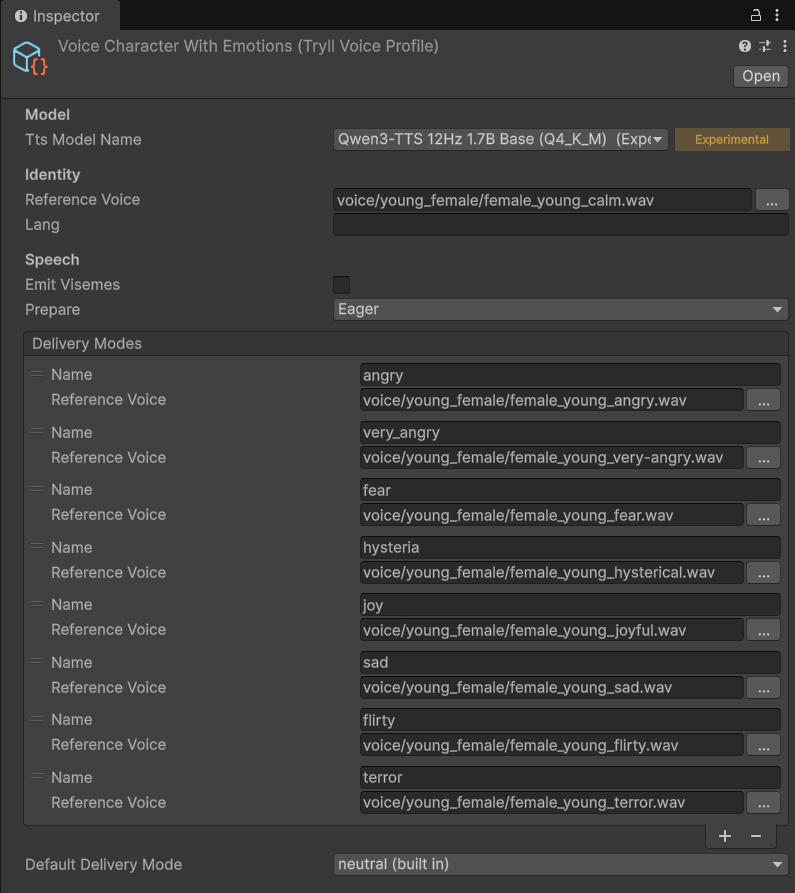
reference_voice clip.
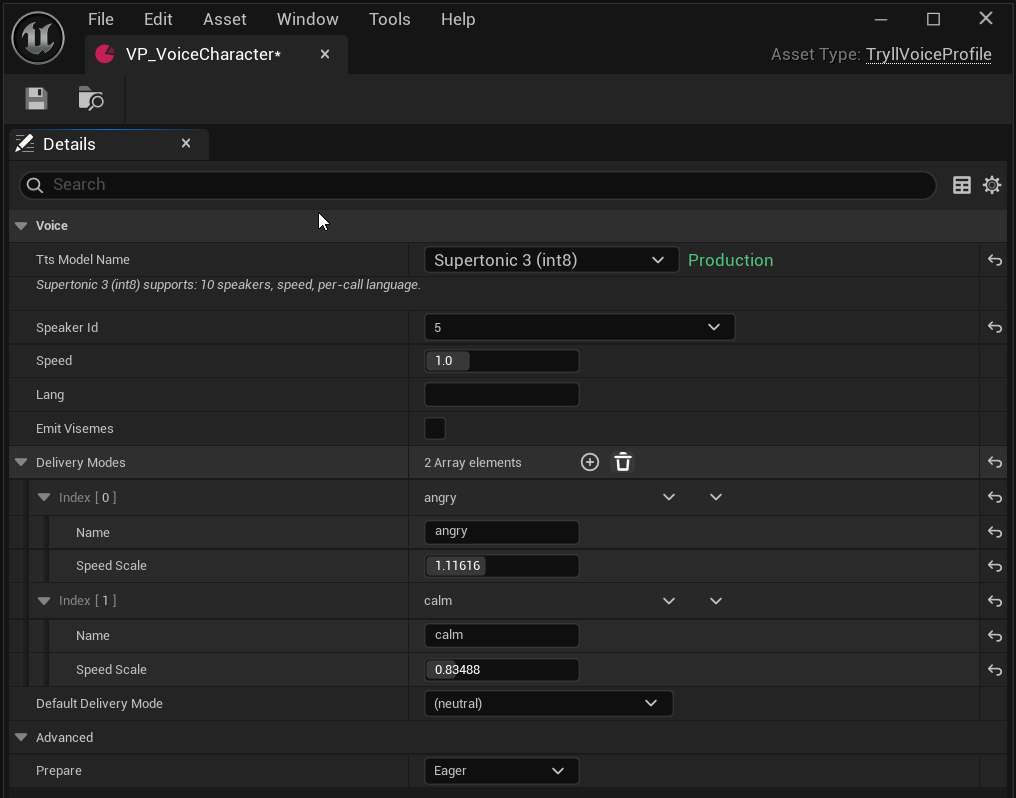
Create a Tryll Voice Profile data asset (UTryllVoiceProfile) and
assign it to the Voice Profile property of the
UTryllAgentComponent. At runtime, call Set Voice and
Set Delivery Mode. See the
Unreal Blueprint catalog.
Diagnostics
With enable_diagnostics on, each speaking node reports the voice it used:
under voice on Speak and under tts on
Generate and Speak.
| Key | Meaning | Absent when |
|---|---|---|
tts_model_name |
The voice's TTS model. | — |
speaker_id, speed, lang, reference_voice |
The profile values as authored. An empty lang means the session locale or catalog default applied; reference_voice is the authored path, not a per-locale file. |
— |
voice_description |
The Maya1 identity. | Not set. |
delivery_mode |
The active mode (neutral when none). |
— |
intensity |
The active intensity. | — |
delivery_instruction |
The active mode's instruction. |
The mode has none. |
emit_visemes |
Whether the voice sends a viseme track. | — |
sample_rate |
The model's native sample rate, in Hz. | — |
Moving from node voice fields
Each old node field has one place in the profile. Chunking stays on the nodes.
| Old node field (protocol v26) | Voice profile (v27) |
|---|---|
tts_model_name |
tts_model_name, now required: an empty name no longer means "first catalog voice" |
speaker_id |
speaker_id |
speed |
speed |
tts_lang |
lang |
tts_voice |
reference_voice |
tts_voice_description |
voice_description |
tts_delivery_instruction |
a delivery mode's instruction, selected with SetAgentDeliveryMode |
emit_visemes (Generate and Speak only) |
emit_visemes, now for every speaking node, including Speak |
min_sentence_chars, first_chunk_max_chars |
not moved: still on both nodes |
If two speaking nodes of one agent had different voice settings, pick one: an
agent now has one voice. Calls that changed a voice field with
ChangeAgentParam become SetAgentVoice (identity) or SetAgentDeliveryMode
(mood).
Errors
| Code | Name | When |
|---|---|---|
3004 |
AgentBusy |
SetAgentVoice while a turn runs or is paused. |
3017 |
ModelLanguageUnsupported |
lang is empty and the model does not declare the session language. |
3023 |
InvalidVoiceProfile |
A profile field fails validation, or the model cannot use it. |
3024 |
UnknownDeliveryMode |
SetAgentDeliveryMode names a mode the profile does not define. |
3025 |
AgentVoiceRequired |
A speaking graph without a voice; or a voice call on an agent created without one. |
See Error Codes.
Related
- Concept: TTS and Voice Output
- Add Voice Output to an Agent
- Clone a Voice from an Audio Sample
- TTS Models — which models ship and what each one accepts
- Speak and Generate and Speak