TryllRuntimeSettings
Type: ScriptableObject
Namespace: Tryll.Client
Source: Runtime/TryllRuntimeSettings.cs
Project-level settings for the Tryll Client package. Persisted to
Assets/Resources/TryllRuntimeSettings.asset (created automatically on first access).
Edit via Project Settings → Tryll Client (registered by TryllRuntimeSettingsProvider).
Selecting the asset itself shows the same fields in the Inspector:
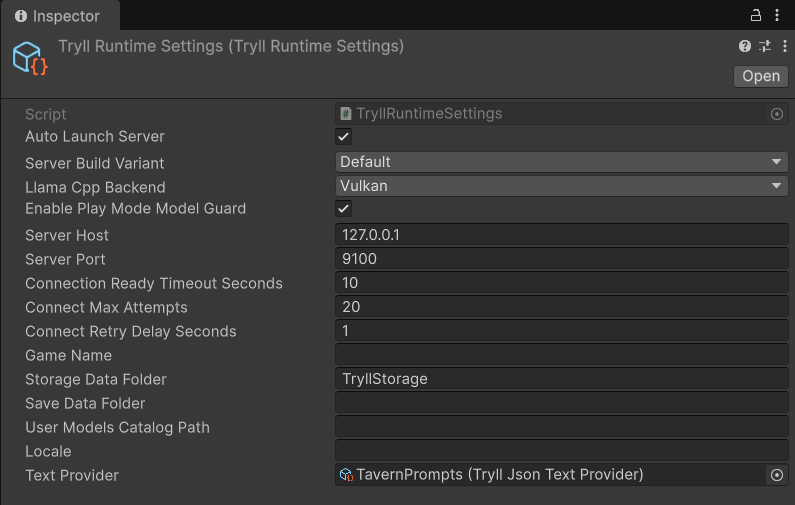
127.0.0.1:9100.Loading at runtime
Load() returns a cached singleton. If the asset does not exist in Resources, it falls
back to default values.
Fields
Server process
| Field | Type | Default | Description |
|---|---|---|---|
AutoLaunchServer |
bool |
true |
When true, TryllClient spawns the bundled tryll_server.exe automatically on startup (Windows only). Set to false when you manage the server yourself. |
LlamaCppBackend |
TryllLlamaCppBackend |
Vulkan |
llama.cpp GPU plugin for an auto-launched server (Vulkan or Auto). Passed as --llama-backend. Auto prefers CUDA on NVIDIA when those DLLs were staged and a player build copies them; Vulkan skips them. Ignored when AutoLaunchServer is false. |
ServerBuildVariant |
ServerBuild |
Default |
Which bundled server payload to launch/stage: Default or Release. |
The server exe is always resolved from the package payload — bundled in the package in the Editor, or the Server/ folder copied next to the player exe at build time — so there is no path to configure.
Connection defaults
| Field | Type | Default | Description |
|---|---|---|---|
ServerHost |
string |
"127.0.0.1" |
Host name or IP address of the Tryll server. |
ServerPort |
int |
9100 |
TCP port the Tryll server listens on. |
Session engines
There are no engine dropdowns. Each model's engine comes from its catalog
entry. BuildEngineDeclarations() derives an optional warm-up hint from the
models registered in the Model Manager, and CreateSession sends it so the
server starts those engines early. The hint never gates a load. See
Choose where models run.
Storage
| Field | Type | Default | Description |
|---|---|---|---|
StorageDataFolder |
string |
"TryllStorage" |
Project-relative root outside Assets/. The editor launches the server with --storage-root pointing here. Default <Project>/TryllStorage/. A path under Assets/ is rejected. Protocol v24 no longer sends this on CreateSession. |
Editor / Play Mode
| Field | Type | Default | Description |
|---|---|---|---|
EnablePlayModeModelGuard |
bool |
true |
When true, entering Play Mode (or the Chat window) verifies every registered model is downloaded first, blocking behind a cancelable dialog if not. |
Telemetry
| Field | Type | Default | Description |
|---|---|---|---|
GameName |
string |
"" |
Human project label. Sent as the session name and as --project-name (empty falls back to the Unity product name). Telemetry groups by a hidden project id, not this field. See Telemetry. |
TelemetryLevel |
TryllTelemetryLevel |
Basic |
Editor detail: Basic (default), Turns, or Full. Passed as --telemetry-level on the next client-dev launch. off is not a choice. See Telemetry. |
See also
TryllClient— reads these settings onAwake- Run the Tryll server
- Manage models in the editor
- Telemetry